Edge password manager delete automation
I used to just use Edge to save all my password on windows, and my passwords would just sync to the cloude with my microsoft account. This was quite convenient, as I was already using Microsoft Authenticator on my phone, so all my devices could auto-fill logins.
But then a few years back, Microsoft in their infinite wisdom, decided to move password into their Edge app on mobile... on android I use chrome, simply because the integration is just that much better with the OS. But this meant my auto-fill wasn't so auto, I had to manually sync the 2 password manager (Microsoft and Google).
Recently I changed phones, and I had enough of this stupidity. I decided to go with a 3rd party password manager and authenticator service where it's truly cross platform.
Since I don't plan to use the Edge password manager anymore, I don't want it keeping a copy of my password, so i decided to delete them. And to my surprise, Edge doesn't have any delete all button.... All instructions i could find online doesn't work with newer revisions of Edge (Why is microsoft so good at regressing functionality??)
If i only have a few dozen passwords, i might have just done it manually thru sheer grit, but I have hundred of passwords saved.
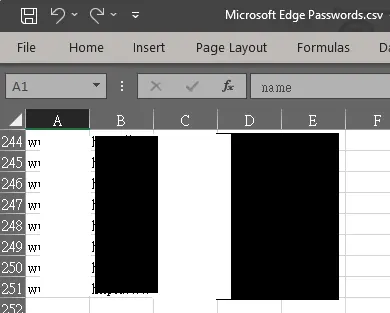
as with anything destructive, save/export the data first. Here you see I have 251 passwords saved.
Since the page is just pure HTML, I could just run some js in the console to automate the clicking of the delete button. The sequence of actions it needs to go thru are as follows:
- Click the first site on the password list
- User may have to authenticate with Windows Hello (script cannot enter pin, since Hello is not part of the web page), so the script would have to wait for the user to auth
- Once auth'd, the website may have multiple accounts saved, so there has to be a loop to click all the delete button
- After each delete button, there's a confirmation popup where we'd have to click a delete button again
- Once all accounts for a site is deleted, the page goes back to the sites list and this whole process it looped until all accounts for all sites are deleted.
flowchart
    A["Open topmost site"] --"Sometimes"--> B["Windows Hello"]
    B ----> C["Delete topmost account"]
    A --> C
    C --> D["Confirm delete"]
    D --> E{"Still sees:<fluent-button appearance="accent">Delete</fluent-button>"}
    E --"Yes"--> C
    E --"No"--> F["Detects site list"]
    F -..-> A
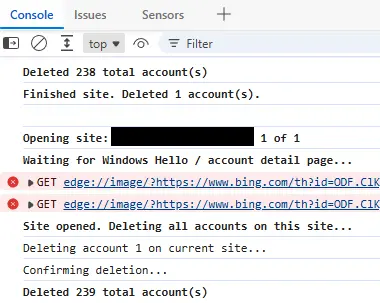
Simply Paste in this code below into the console and it'll automate this process. tho you'll still have be be supervising it, since sometimes you'll have to auth Windows Hello.
For 200+ accounts, i only auth'd twice in the whole process, which took just a few minutes.
Note
Newer revisions of Edge might break compatibility with this script, I ran this on Version 150.0.4078.83
(async () => {
    // ============================================================
    // SETTINGS
    // ============================================================

    // For a full run, leave as Infinity.
    // For testing, change to something small like 2 or 3.
    const MAX_DELETES = Infinity;

    const POLL_INTERVAL = 250;
    const BETWEEN_DELETES = 500;


    // ============================================================
    // CONTROL
    // ============================================================

    window.passwordDeleteController = {
        stop: false,
        deleted: 0
    };

    const ctl = window.passwordDeleteController;


    // ============================================================
    // HELPERS
    // ============================================================

    const sleep = ms =>
        new Promise(resolve => setTimeout(resolve, ms));


    function getAllElements(root = document) {
        const results = [];

        function walk(node) {
            if (!node?.querySelectorAll) return;

            for (const el of node.querySelectorAll("*")) {
                results.push(el);

                if (el.shadowRoot) {
                    walk(el.shadowRoot);
                }
            }
        }

        walk(root);
        return results;
    }


    function visible(el) {
        if (!el) return false;

        const style = getComputedStyle(el);

        return (
            style.display !== "none" &&
            style.visibility !== "hidden" &&
            el.getClientRects().length > 0
        );
    }


    function cleanText(el) {
        return (el?.textContent || "")
            .replace(/\s+/g, " ")
            .trim();
    }


    async function waitFor(fn, description, timeout = 0) {
        const started = Date.now();

        while (true) {
            if (ctl.stop) {
                throw new Error("Stopped by user.");
            }

            const result = fn();

            if (result) {
                return result;
            }

            if (timeout && Date.now() - started > timeout) {
                throw new Error(
                    `Timed out waiting for: ${description}`
                );
            }

            await sleep(POLL_INTERVAL);
        }
    }


    // ============================================================
    // FIND MAIN PASSWORD-LIST ENTRY
    //
    // Example aria-label:
    // "apple.com 10 of 181"
    // ============================================================

    function findPasswordEntry() {
        const candidates = getAllElements()
            .filter(el =>
                el.tagName === "FLUENT-BUTTON" &&
                el.hasAttribute("icon-only") &&
                visible(el)
            )
            .map(el => {
                const label =
                    el.getAttribute("aria-label") || "";

                const match =
                    label.match(/(\d+)\s+of\s+(\d+)\s*$/i);

                return {
                    el,
                    label,
                    index: match ? Number(match[1]) : null,
                    total: match ? Number(match[2]) : null
                };
            })
            .filter(x => x.index !== null);

        candidates.sort((a, b) => a.index - b.index);

        return candidates[0] || null;
    }


    // ============================================================
    // FIND ACCOUNT DELETE BUTTON
    //
    // <fluent-button appearance="accent">Delete</fluent-button>
    // ============================================================

    function findFirstDeleteButton() {
        return getAllElements().find(el =>
            el.tagName === "FLUENT-BUTTON" &&
            el.getAttribute("appearance") === "accent" &&
            cleanText(el) === "Delete" &&
            visible(el)
        );
    }


    // ============================================================
    // FIND CONFIRMATION DELETE BUTTON
    //
    // <fluent-button
    //   slot="action"
    //   appearance="primary"
    //   aria-label="Delete">
    // ============================================================

    function findConfirmDeleteButton() {
        return getAllElements().find(el =>
            el.tagName === "FLUENT-BUTTON" &&
            el.getAttribute("slot") === "action" &&
            el.getAttribute("appearance") === "primary" &&
            el.getAttribute("aria-label") === "Delete" &&
            visible(el)
        );
    }


    // ============================================================
    // WAIT FOR EITHER:
    //
    // A) another Delete button on current site
    // B) return to main password list
    // ============================================================

    async function waitForNextState() {
        return await waitFor(
            () => {
                const anotherDelete =
                    findFirstDeleteButton();

                if (anotherDelete) {
                    return {
                        type: "detail",
                        button: anotherDelete
                    };
                }

                const listEntry =
                    findPasswordEntry();

                if (listEntry) {
                    return {
                        type: "list",
                        entry: listEntry
                    };
                }

                return false;
            },
            "another account or password list",
            20000
        );
    }


    // ============================================================
    // START
    // ============================================================

    console.log(
        "%cPassword deletion automation started.",
        "font-weight:bold"
    );

    console.log(
        "Windows Hello must be completed manually."
    );

    console.log(
        "Stop anytime with:"
    );

    console.log(
        "passwordDeleteController.stop = true"
    );


    // ============================================================
    // OUTER LOOP: SITES
    // ============================================================

    while (
        !ctl.stop &&
        ctl.deleted < MAX_DELETES
    ) {

        // --------------------------------------------------------
        // Wait for main password list
        // --------------------------------------------------------

        const entry = await waitFor(
            findPasswordEntry,
            "password list"
        );

        const {
            el: entryButton,
            label
        } = entry;


        console.log("");
        console.log(
            `%cOpening site: ${label}`,
            "font-weight:bold"
        );


        entryButton.scrollIntoView({
            block: "center",
            behavior: "instant"
        });

        await sleep(200);

        entryButton.click();


        // ========================================================
        // WINDOWS HELLO
        //
        // You enter your PIN manually.
        //
        // Script waits until Edge exposes the site's account cards.
        // ========================================================

        console.log(
            "%cWaiting for Windows Hello / account detail page...",
            "font-weight:bold"
        );


        await waitFor(
            findFirstDeleteButton,
            "Delete button on account detail page"
        );


        console.log(
            "%cSite opened. Deleting all accounts on this site...",
            "font-weight:bold"
        );


        // ========================================================
        // INNER LOOP: ACCOUNTS ON CURRENT SITE
        // ========================================================

        let accountsDeletedThisSite = 0;


        while (
            !ctl.stop &&
            ctl.deleted < MAX_DELETES
        ) {

            // ----------------------------------------------------
            // Make sure there is still an account Delete button
            // ----------------------------------------------------

            let deleteButton =
                findFirstDeleteButton();


            if (!deleteButton) {

                const state =
                    await waitForNextState();


                if (state.type === "list") {

                    console.log(
                        `%cFinished site. Deleted ${accountsDeletedThisSite} account(s).`,
                        "font-weight:bold"
                    );

                    break;
                }


                deleteButton =
                    state.button;
            }


            // ----------------------------------------------------
            // Delete current account
            // ----------------------------------------------------

            console.log(
                `Deleting account ${accountsDeletedThisSite + 1} on current site...`
            );


            deleteButton.scrollIntoView({
                block: "center",
                behavior: "instant"
            });


            await sleep(150);


            deleteButton.click();


            // ----------------------------------------------------
            // Wait for confirmation dialog
            // ----------------------------------------------------

            const confirmDelete =
                await waitFor(
                    findConfirmDeleteButton,
                    "Delete confirmation dialog",
                    15000
                );


            // ----------------------------------------------------
            // Confirm deletion
            // ----------------------------------------------------

            console.log(
                "Confirming deletion..."
            );


            confirmDelete.click();


            // ----------------------------------------------------
            // Wait until confirmation dialog disappears
            // ----------------------------------------------------

            await waitFor(
                () => !findConfirmDeleteButton(),
                "confirmation dialog to close",
                15000
            );


            ctl.deleted++;
            accountsDeletedThisSite++;


            console.log(
                `%cDeleted ${ctl.deleted} total account(s)`,
                "font-weight:bold"
            );


            // ----------------------------------------------------
            // Let Edge update the card list
            // ----------------------------------------------------

            await sleep(400);


            // ====================================================
            // WHAT HAPPENED?
            //
            // Another account?
            //   -> loop again
            //
            // Back to password list?
            //   -> leave inner loop
            // ====================================================

            const nextState =
                await waitForNextState();


            if (nextState.type === "list") {

                console.log(
                    `%cFinished site. Deleted ${accountsDeletedThisSite} account(s).`,
                    "font-weight:bold"
                );

                break;
            }


            console.log(
                "Another account found on this site."
            );


            await sleep(250);
        }


        // ========================================================
        // PREPARE FOR NEXT SITE
        // ========================================================

        if (ctl.stop) {
            break;
        }


        if (ctl.deleted >= MAX_DELETES) {
            break;
        }


        await waitFor(
            findPasswordEntry,
            "password list",
            20000
        );


        await sleep(
            BETWEEN_DELETES
        );
    }


    // ============================================================
    // FINISHED
    // ============================================================

    console.log("");
    console.log(
        `%cFinished. Deleted ${ctl.deleted} account(s).`,
        "font-weight:bold"
    );

})().catch(err => {

    console.error(
        "Password deletion stopped:",
        err
    );

});
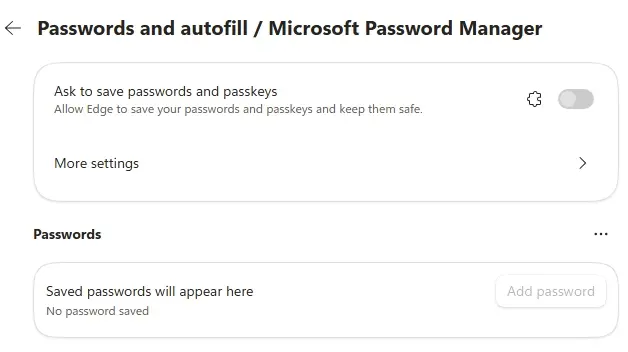
and viola, all passwords cleared